Showing posts with label C#. Show all posts

Monday, January 30, 2012

Urdu to English Dictionary

Translators are not super humans or machines which take input in one language and provide output in another. They are like ordinary people, but a bit clever in using a dictionary. So it is the dictionary which makes a translator 'actual' translator. As there is always a women behind a successful man, there is a good dictionary behind a successful translator, in this case I must say a bunch of dictionaries. :-) As I work as a translator English <-> Urdu and Punjabi. En <> Ur combination is mostly demanded and for this purpose I am in a continuous need of dictionary. I had a dictionary for English to Urdu, as I mentioned here my adventure to integrate dictionary word list to OmegaT. 

This dictionary solved half of my problem i.e. En > Ur. But the revrse was still a headache. I always had to refer to UrduEnglishDictionary.org for searching English equivalents of Urdu words. But then, as I always sometimes do, I woke up and decided to do something on my own. So what I've done is changed the English > Urdu wordlist to work for Urdu > English purposes. It is a dirty solution, there are still lots of problem in the word list, and ideally there should have been a word list typed specifically for Urdu > English purposes. But this quick dirty solution works in most cases for me. And I am sharing it here online, so people struggling for Urdu > English equivalents may get some relief. There are lots of good dictionaries out there, but this is yet another dictionary in already available variety. And hopefully it will benefit other translators and users.
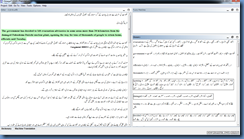
Urdu to English Dictionary in C#
There is nothing fancy, no help, no license and no xml type system to store word list. The word list is simply a text file with entries on new line and Urdu words are separated from English counterparts using a tab. The dictionary loads this file and then searches for appropriate word. The search pattern in very simple. By default it will search for exact match (which is dictionary look up method of c#) and additionally it will iterate through all dictionary key value pairs and add the entries which start with search query. The second radio button, if checked, will only give exact match, or if nothing found there won't be any result. This much is sufficient for me in most cases. I am hoping it would be for most people as well. It is compiled on Windows 7 64 bit. So I am not sure whether it would work on every system (including Windows 7 32 bit). But I am attaching source project as well as compiled dictionary. The project can be compiled using Sharp Develop 4. The dictionary assumes that you have installed Jameel Noori Nastaleeq. Please get it if you don't have.
Dictionary
Source Code (Sharp Develop Project) 

Update: Another dictionary was added afterwards, a 27000 words dictionary provided from Alqlm.org.
Dictionary
Source Code

Thursday, September 22, 2011

Creating an Urdu Translation Glossary with C#

After a long time I have come back to C#. My limited skills allow me to do some things only with text processing and as I trained my self, my little silly looking C# scripts deal with file operations, getting word frequencies, getting counts from different text files etc etc. As I use C# as Python or other scripting language should be used, to write small programs to do tiny miny things, so I consider myself less of a programmer. But still I am in between a layman and a programmer, and can write a few bits of code. This time, after several months when I came back to C#, it was the urge to create an Urdu Glossary which can work with OmegaT. OmegaT is an open source translation memory tool, and I use it for most of my translations. And I need dictionary constantly as well, but the dictionary I use Urdu Web Lughat which is written in C# 2 and fits my purpose very well, when I add this Lughat File instead of default file which has only a few thousand words. This file has 92661 words and expressions which usually provide me insight for the correct translation, not to mention several other Urdu lughats have been merged with original few thousand words file to create this file. Well it serves the purpose, but it creates problem as well. I have to type each word in its lemma form i.e. if it is a verb in with third form e.g. got, I’ll have to write fist form get to get the meaning. Other problems are with the application.
urdu-web-lughat
Urdu Web Lughat
As the picture shows, capability to search the desired word from Google, Wikitionary, and Urdu Wikipedia as been added to it. This is done by default Internet Explorer Engine provided for C# 2005, but it creates problem while using in higher versions of Windows e.g. Windows 7. Each time I seek a word, it will show 2 or more dialogue boxes showing this error.
lughat-error
Urdu Web Lughat Error
I think I’ve the source code and can fix the problem by simply disabling this feature. But my other problem remains, that is typing the word each time, it takes too much time. So I was seeking for a solution. The solution I figured out was simple, put the lughat file in OmegaT somehow. And that’s possible through dictionary or glossary setup of the program. I find the dictionary process of OmegaT quite complicated (it requires Star Dict format). So I think its more feasible to put a glossary file instead (which is in this format word-tab-meaning). This was easy for me. I wrote a regular expression to match the lughat file’s xml and to extract each word meaning node (Don’t tell me it would have been easy with xml parser, I do not know it so regex was best for me). So here is the code I used to convert the nodes of xml in tab separated text file with each word meaning pair on new line.
public static void test ()
        {
            string match = "\\<I\\>\\s*\\<w\\>(?<Word>[^><]+)\\</w\\>\\s*\\<m\\>(?<Meaning>[^><]+)\\</m\\>\\s*\\</I\\>";
            string text = File.ReadAllText(@"G:\Software\Dictionary\dictionary.xml");
            Console.WriteLine(text.Length);
            //Console.Read();
            MatchCollection m = Regex.Matches(text, match);
            StreamWriter sw = new StreamWriter(@"G:\Software\Dictionary\Glossary.txt", true);
            string word = "";
            string meaning = "";
            Console.WriteLine(m.Count);
            //Console.Read();
            for(int i=0; i<m.Count; i++)
            {
                word = Regex.Replace(m[i].Groups["Word"].Value, "[\\r\\n]+", " ");
                meaning = Regex.Replace(m[i].Groups["Meaning"].Value, "[\\r\\n]+", " ");
                sw.WriteLine(word+"\t"+meaning);
                Console.WriteLine(word);
            }
            sw.Close();
        }
I know it could be improved a lot, but it did the work and did it pretty soon. I put the glossary file in OmegaT project folder as it was required (/project/glossary/Glossary.txt) and that’s done.
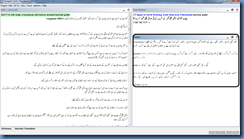
OmegaT-with-UrduGlossary1
OmegaT with Glossary 1
I was able to see the word meaning for each sentence in the glossary box in lower right box. It was quite a help for me and reduced my time. But then came the other problem: I still had to go to dictionary and type the lemma forms of verbs and plural nouns, so there was no meaning available for worked, working, works but only for the 1st  form i.e. work. This was quite frustrating for me because the actual problem was still there. So I decided to add the other forms of the words which had more than one forms. I decided to add new lines in the glossary for each form of verb, and add lines for plural forms of nouns as well. The idea was simple enough, but to accomplish it I had to grab a lemma list. Fortunately, being a corpus linguistics student, I know one out on internet. E_Lemma.txt has been created for Word Smith Tools, but I used it for my purpose. The code I used to extract lemmas of each word, and add them to new glossary file is below.
public static void Main(string[] args)
        {
            string[] lines = File.ReadAllLines(@"G:\Software\Dictionary\Glossary.txt");
            string[] lemmas = File.ReadAllLines(@"F:\Corpus Related\e_lemma.txt");
            string word = "";
            string meaning = "";
            string lemma = "";
            StreamWriter sw = new StreamWriter(@"G:\Software\Dictionary\Glossary2.txt", true);
            int count = 1;
            foreach(string line in lines)
            {
                Console.WriteLine(count+" of "+lines.Length);
                word = Regex.Split(line, "\t")[0].Trim();
                meaning = Regex.Split(line, "\t")[1].Trim();
                lemma = giveLemma(word, lemmas);
                if(lemma!="")
                {
                    foreach(string lemma1 in lemma.Split(' '))
                    {
                        sw.WriteLine(lemma1+"\t"+meaning);
                        Console.WriteLine(lemma1+"\t"+meaning);
                    }       
                }
                else
                {
                    sw.WriteLine(word+"\t"+meaning);
                    Console.WriteLine(word+"\t"+meaning);
                }
                count++;
            }
            sw.Close();
        }
        public static string giveLemma (string word, string[] lemmas)
        {
            string toReturn = "";
            string lemma1 = "";
            string lemma2 = "";
            foreach(string lemma in lemmas)
            {
                lemma1 = Regex.Split(lemma, "->")[0].Trim();
                lemma2 = Regex.Split(lemma, "->")[1].Trim();
                if(word==lemma1)
                {
                    toReturn += lemma1 + " " + Regex.Replace(lemma2, ",", " ");
                }
            }
            return toReturn;
        }
As it can be seen, the task is pretty simple.
  • Get each line from previously made glossary file.
  • Split the word and meaning.
  • Pass the word to another function, along with the lemma list (got from e_lemma.txt file) and return all possible forms of a verb or a noun.
  • At the end write a new line for “word-tab-meaning” pair for each lemma form of verb or noun.
  • And if there is no lemma, simply write the original word meaning pair.
The task was simple but the code was quite inefficient, so it took a long time to do this task. It took almost 1.5 hour to do it. But it was done and worked like a charm. See Smile
OmegaT-with-UrduGlossary2
OmegaT with Glossary 2
So a glossary for Urdu Translators working with OmegaT is available. And of course it can be downloaded from here.

Friday, September 2, 2011

Mono Touch and Mono for Android

I am supposed to write something on Linguistics now, but my plans fail every time when I come to a topic which love somehow. Mono is a one of the topics I always love to explore and talk about. It is the only thing which links me to programming on Linux because I can use my limited C# programming skills in MonoDevelop using Mono. It is a great application, and despite criticism from certain open source 'lovers', the merger of original company to Novell and now separation as Xamarin, this project kept on going. I am in love of this project and C#.

Once upon a time Mono was considered a rival of Java and other Virtual Machine based programming languages in the open source world. It was debated, re-debated and criticized. I remember the time when Ubuntu was even criticized on including mono packages in default installation CD. But those were simpler times. There were no 'intruders' in Adam's Heaven, there were no Tablets and so called touch devices. There was no Android. There was no hype to buy iPads, ThinkPads, TouchPads and like. So, all that people talked about was how much C# has been implemented by Mono, how much is there chance of Microsoft suing Novell over its patents regarding C#, how MoonLight is gonna fail, what kind of new applications are built on Mono lately, and whether Linux distros should adopt F-Spot, Banshee etc etc. The life was simpler at that time.

And now, when market is flooded by touch devices and people are mad to have one. There are new platforms and new software development kits. iOS is providing and promoting Objective C on its own SDK, Android is promoting its own SDK. Although Windows Phone is out there, but its only on 1% devices still in US (as I was reading somewhere today). Its true as far as Windows Phone is alive C# is alive (somehow). The libraries may change, names may vary whether it is Windows Presentation Foundation or SilverLight but the underlying language syntax would remain same. But this is about Windows world. What about Mono and Linux? As far as I know, Mono could never be a main stream application development framework in Linux world. It was appreciated by many, it was used by many, it produced very good and popular applications e.g. Banshee (I really liked this elegant media player), but the fact is that (for desktop users at least) applications written in Python or other such languages keep on appearing more often as compared to Mono and C# based applications. So it was natural to move towards touch devices for Mono to create its existence in a wider space.

There were other reasons as well. Mono always tried to target those developers who had C# skills and now wanted to create enterprise or other applications on other platforms e.g. Mac, Linux. Mono promised to provide support for porting existing .Net applications, to develop new ones, and to provide commercial support for Suse Linux Enterprise. The same theme was carried forward when Mono moved to Mono Touch. The idea is fairly simple, as the website also states that "use existing skills to create native iOS applications". They had good experience in joining C code of GTK with C# code of Mono to create GTK#, and joining other Gnome APIs to C# Mono framework. They've used the expertise to link Objective-C to existing Mono framework. You write in C# but the code generation would be in Objective-C. That's very cool idea, you do not have to re-learn Objective-C and a hell lot of APIs specific to iOS platform. Simply use Monodevelop to create an App and deploy it on the App Store.

Same is the case with Mono for Android. A few years back there were efforts to convert Java code to C#, and vice versa using IKVM and this was used on Mono also. Developers might be still using this technology to call Java APIs through Mono on a C# application. But the point here to mention was that Mono is trying to do something similar regarding Mono for Android. Most of the code for Android is in Java, so the Apps require Java and Google's platform specific APIs for Android. Mono for Android provides same thing here as well, as it does for iOS. It translates the code written in C# to one that is acceptable by Android.

This way, Mono is being alive and going forward. I have my best wishes that this platform should keep going on this way on new platforms. Thus the original i.e. Mono for PCs can be guaranteed, because no one will develop Mono if there is no money. So best of luck Mono. I love you ;-)

Saturday, May 29, 2010

Regular Expressions: Facility, Ability and Haste

Regular Expression or regex is a powerful tool for text processing. People like me who encounter with text processing on daily basis know the ease and power they provide. Regex are full fledged language actually, a mini language with its own rules and very systematic and organized structure. Regex as they are known today are mostly borrowed from early days of Perl, that's why they are mostly called Perl Compatible Regular Expressions. No high level language can ever miss this most demanding feature in today's circumstances, and even the parent of many new languages C++ will have regex library in its new C++0x version/standard.
I came to know about regex 3 years ago when I was working with my teachers on their corpus research work. I was unable to grasp the meaning of regex initially and the power they had behind them. But after some time I got books and article on the topic and started learning them. The book most helpful for me was Friedl - Mastering Regular Expressions 3e (O'Reilly, 2006). I completed only 2 chapters of this book but it made me speedy panther in text processing from a lame lamb. Being a linguistics student and a corpus linguist I am always seeking ways to get text patterns automatically with least possible time. And regex provide me this facility. Along with regex I use C# 2005 which gives me a powerful capability to do everything I want with the texts.

Regex are good but they are like knife in your hand which can be used to cut your own hand also. You should be very well aware of the pros and cons of using regex. The very first thing you should consider as a corpus linguist is to search the regularities in the text. These regularities or patterns will help you find the perfect regex for the purpose. The best strategy is to analyse the data manually e.g. by inspecting concordance lines in search of the required constructions. After you have inspected and found the ways in which the construction is occurring, you can create a good and regex. But remember cross check, double check and recheck your regular expression to verify does it doing the maximum? Does the loss is minimum? And finally does it affordable? Affordable here I mean if it is hasty to add every construction and thus increasing your work. Regex give power and flexibility but they should be carefully used. They should be constructed with great care and also verified with manual analysis. And the most important thing, use regex to get concordance lines which you will inspect manually thus you can reduce your work as well as quality would be maintained.

Wednesday, May 12, 2010

Sorting a Dictionary in C# 2

During corpus processing tasks, I need to create and sort dictionaries for very simple tasks of frequency list generation. For this purpose I always have to seek on the web for solutions. C# is now at version 4 and it has lots of variations and innovations in its syntax. There are additional typing conventions, keywords, namespaces like powerful System.LINQ and extension methods. But being a linguistics student I am unable find time to upgrade my skills from C# 2005 a.k.a C# 2 to latest versions. It is not necessary perhaps also because I need C# for text processing tasks which is done very easily with C# 2 and its System.Collections.Generic namespace.
So here is a code sample which can be used to sort a dictionary with respect to its values. I have blended 2 or 3 methods into one so that it takes input as dictionary and gives output as dictionary. Code may be inefficient due to my inabilities in programming but still it works for me. Hopefully for you it would work also. :-)
public static Dictionary Sort (Dictionary dict)
{
List> list = new List>();
foreach(KeyValuePair kvp in dict)
{
list.Add(kvp);
}
list.Sort(
delegate(KeyValuePair firstPair,
KeyValuePair nextPair)
{
return nextPair.Value.CompareTo(firstPair.Value);
}
);
Dictionary d = new Dictionary();
foreach(KeyValuePair kvp in list)
{
d.Add(kvp.Key, kvp.Value);
}
return d;
}

Friday, April 16, 2010

Oracle: Death Eater or Lover for Open Source?

Sun Microsystems 'was' one of the biggest competitors of Microsoft in open source world. It is true they ruled the world with Java and its bi-products but when Microsoft challenged the rule of Java on internet by introducing .Net framework and a new Java like language C#, Sun became more open. Whether it was a business decision or it was really the love of open source world that Sun opened up regarding Java. Sun opened up Java round about 3 years ago. Sun was the biggest contributor to OpenOffice.org, the one and only open source office suit which can some how face MS Office. Sun was going well and every thing was going happily. But........ real world is not like the stories of princes and princesses who live happily always, so Sun had to face the challenge. A big fish Oracle proposed Sub to be eaten, and Sun agreed. And now Sun is gradually being eaten by Oracle.
That is the fate of small companies that they are eaten up or in more 'technical terms' acquired by bigger ones. First MySql was acquired by Sun and then Oracle acquired Sun. And the result was that the only open source and low cost competitor of Oracle Enterprise Database is no longer harmful for Oracle. Because they are now (step) brothers. Though Oracle is promising to run MySQL as it was run previously but they are in better ever position to keep MySQL 'on track' now.
Java is something for which Sun is known in the open source world, specially after the opensourcing of Java. Java introduced new competing technologies under the banner of Sun as JavaFX. But it is moving slowly since a year or so, obviously it is due to the replanning which is taking place in Sun after the acquisition by Oracle.
Open Solaris is a Unix like operating system and again it was open source. But the community governing the matters of Open Solaris is now being frustrated by the silence of Oracle regarding the future of the operating system. Would it be of worth for Oracle in the case that they already have a fork of Redhat Enterprise Linux names Oracle Unbreakable Linux. Well, people at Open Solaris community are even willing to fork the project and continue it independently. Whether it would be good or bad, or whether Open Solaris would continue its existence or die slowly, the time will tell about it.
Sun was a big contributor to open source OOo, Java, Open Solaris and MySQL are now looking at Oracle for the future. Out of all, I think OOo is somehow independent and is going well. MySQL is now more business oriented and no more free bits as yummy as they were some time in near past. Java is still in a state of coma, and Open Solaris: there looks something hot under the surface of calmness. Let us see what happens.